Lebra Shield vs. JustFOIA for school districts
Compare Shield and JustFOIA using a school district email-review scenario, verified product documentation, approval checks and retention requirements.

A district comparing Lebra Shield and JustFOIA should ask both vendors to complete the same request, using the same sample records and the same approval requirements. That reveals more than a list of features with similar names.
This comparison is published by Lebra. It uses JustFOIA’s product documentation and Shield’s implementation documentation, reviewed on November 10, 2026. It is not a head-to-head benchmark, a price ranking or a claim that one system produces more accurate redactions.
What JustFOIA documents
JustFOIA describes in-platform redaction, automated pattern searches, exemption reasons and logs, draft review, approvals, and integrations with Adobe Acrobat Pro and Laserfiche. Its documentation also describes metadata removal and controlled release of redacted documents. Ask which capabilities and external licenses are included in the proposed configuration. JustFOIA redaction features
That means the comparison should not start with the assumption that JustFOIA merely tracks requests or lacks redaction review. Treat its documented capabilities as items to demonstrate on your district’s records.
For an email-heavy district, ask the vendor to trace an original message and attachment into the review screen and final output. Request a written explanation of supported export formats and any preprocessing that staff must perform.
What Shield is designed to organize
Shield’s documented workflow connects intake and scope confirmation with imported-record review, sorting, redaction decisions, optional attorney approval and response delivery. Its public request form and requester status page support communication around that review.
For a records custodian, the central question is whether the product keeps the decision trail understandable. Can a colleague see the agreed scope, the imported material, the unresolved review questions and who approved the final response?
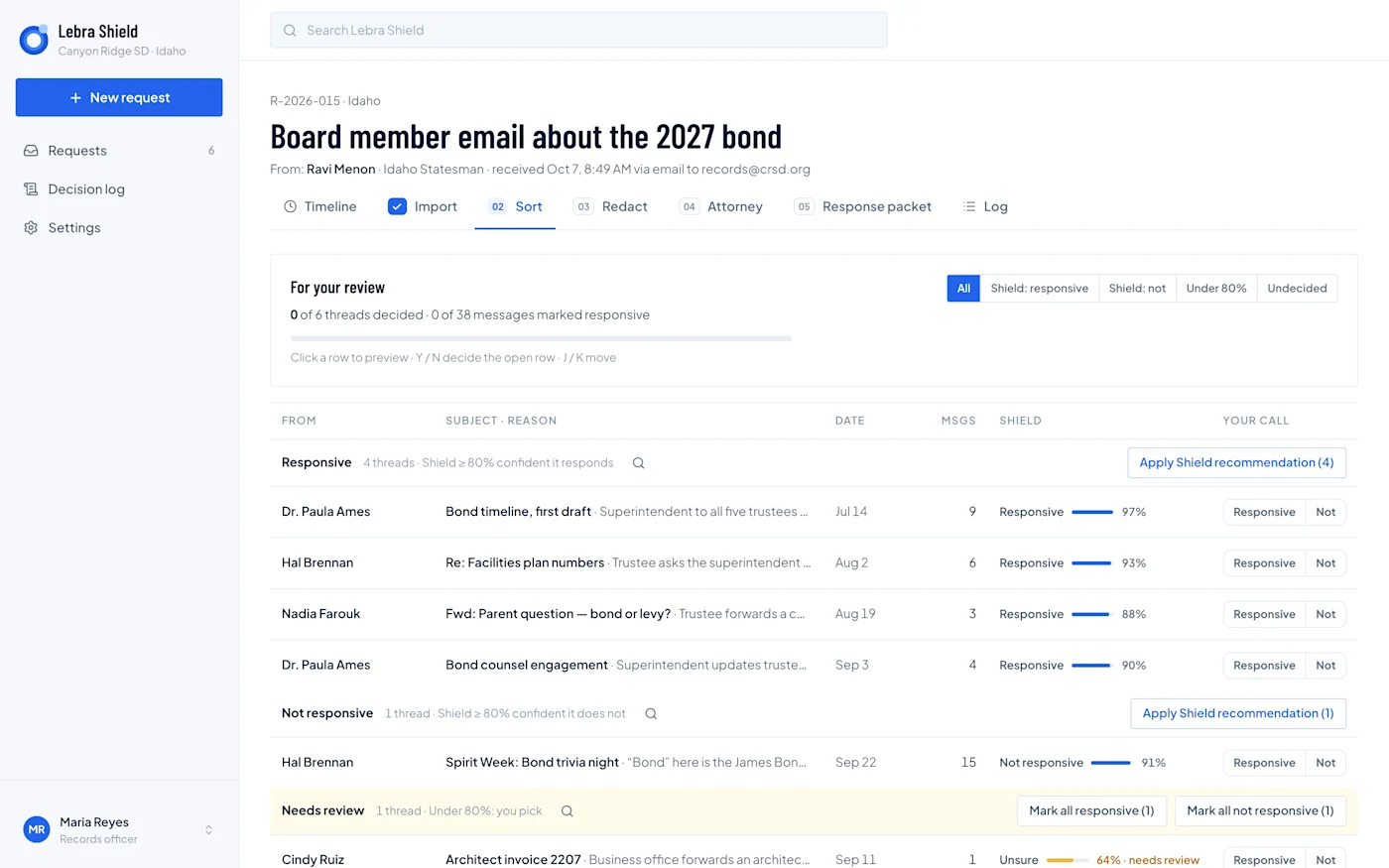
Shield demonstration interface with fictional Canyon Ridge records. The Sort screen shows responsiveness suggestions alongside the reviewer’s decision. Demo scores are not independent accuracy measurements.
Shield’s documented people-confirmation process asks staff to identify the people mentioned in the records and correct proposed roles. It uses that context during redaction review rather than requiring an SIS roster upload. This is worth testing with a name that belongs to more than one person.
Run a school district email test
Create a fictional request for correspondence about a facilities bond. Include a budget discussion, an unrelated bond-themed event, a forwarded parent message, a repeated attachment and a message requiring counsel’s judgment.
Ask both vendors to demonstrate the work in this order:
Confirm the scope and the accounts or custodians to search.
Import the collection and account for any rejected or unreadable files.
Separate responsive records from unrelated material.
Review proposed redactions in the full message context.
Correct an incorrect suggestion and record the explanation.
Hand the draft to a second reviewer.
Produce a final package and inspect it outside the review screen.
Do not reveal every expected answer before the first pass. Otherwise you may be measuring how well the presenter follows your instructions rather than how the workflow exposes issues to a reviewer. Afterward, compare results with your answer sheet and discuss disagreements.
Compare approval, not just the redaction toolbar
A district needs to know when work becomes an approved release. Demonstrate what happens if a reviewer changes a decision after the draft has been prepared. Ask how the system prevents the team from sending an outdated version.
Shield’s documented approval path is explicit: the custodian reviews and approves the response when attorney review is not required, or enables attorney review and sends the draft to counsel. Approval locks the review decisions for production. Delivery is a later action.
For JustFOIA, ask the vendor to demonstrate the draft-sharing and approval capabilities described in its documentation. In both products, identify who can approve and who can actually deliver. A second person viewing a PDF is not necessarily the same as a recorded approval workflow.
Check imports and difficult documents honestly
Shield’s documented review starts with uploaded records, including Google Vault MBOX/EML and associated metadata, plus supported standalone documents. It is not a live search connector into every district source.
Do not assume that PST, a general Microsoft 365 import workflow or OCR is available in Shield. PDFs and reproduced Word or spreadsheet content need human visual review. Scanned or image-based records may require a separate handling decision.
Ask JustFOIA the same specific questions about your file types and purchased integrations. If a district already licenses Acrobat or Laserfiche, include both the benefits and the additional handoffs in the evaluation. The useful comparison is the complete process your staff will operate.
Inspect the released files
Take the final output out of the demonstration environment. Open it in the district’s usual reader, search for the values intended to be removed, copy surrounding text and inspect attachments. Confirm that the response letter describes what was actually released.
Review the record identifiers and explanations of withholding. A reviewer should be able to connect a disputed item back to the original collection and the decision made about it. Include at least one record that failed to import so the vendor has to explain how it is resolved.
These are proposed acceptance checks, not claims about either vendor’s measured performance.
Decide where the district’s permanent record will live
Shield closes and purges working request content, retaining a content-free closure record. Export the required production and audit material before closing. A district that expects the request platform to be its permanent archive should address that requirement directly.
Ask JustFOIA how retention, export and contract exit work in the proposed package. Compare the same users, volume, storage, implementation, support and external licenses over the same term. Include staff time for preparation and final review.
Use the buyer’s guide to record demonstrated capabilities and remaining gaps. Book a Shield demonstration with the same sample packet, and ask each vendor to commit its proposed scope in writing.
See what Lebra Shield can do for your district.
Schedule a demo