How to choose public records request software for a school district
Evaluate school district public records software with a realistic test, clear acceptance criteria, product scope and total-cost comparisons.

The best public records software evaluation ends with a checked response package, a clear account of staff responsibilities and a price tied to a specific configuration. It should not end with a feature checklist that nobody has tested.
For school districts, the work crosses records administration, IT collection, privacy review, legal judgment and delivery. This guide provides a practical buying process and explains where Lebra Shield fits. It is written by Lebra, not an independent product ranking. Product scope was reviewed on November 10, 2026.
Define the problem you are buying software to solve
Start with three recent requests. Record where staff waited, repeated work or lost context. Distinguish intake and assignment delays from export preparation, document review, approval and delivery.
A district that receives few requests but reviews large email collections may have a different priority from one replacing a heavily used public portal. Both need a complete response process, but the most valuable demonstration will focus on their actual bottleneck.
Write a short success statement: “A backup custodian can understand every open request,” or “Reviewers can explain why every source record was produced, withheld or excluded.” These statements give the vendor something concrete to demonstrate.
Build a representative test collection
Use fictional or otherwise authorized material. Include ordinary public business, an unrelated message with matching keywords, repeated attachments, ambiguous names, a scan and a document with a layout that matters. Ask your reviewers to prepare an answer sheet before the demonstration.
Measure preparation time, review time, correction time and final inspection time separately. Count missed issues and unnecessary redactions as well as the initial processing speed. Do not compare one product’s automated pass with another product’s complete approved response.
NIST’s generative AI risk profile warns about confident false outputs and cautions against generalizing from narrow assessments. A district-specific test is therefore more useful than treating a polished example as an accuracy guarantee. NIST AI 600-1
Evaluate the whole workflow in Shield
Shield’s documented process runs through Timeline, Import, Sort, Redact, optional Attorney review, Response packet and Log. Intake confirms the request scope. Sorting supports responsiveness decisions. People confirmation and redaction review help the district evaluate sensitive passages. Approval and delivery remain separate actions.
Shield also documents public request intake, requester correspondence and a status page. It is not merely a redaction utility, but its particular state configuration, file support and retention behavior must fit the district.
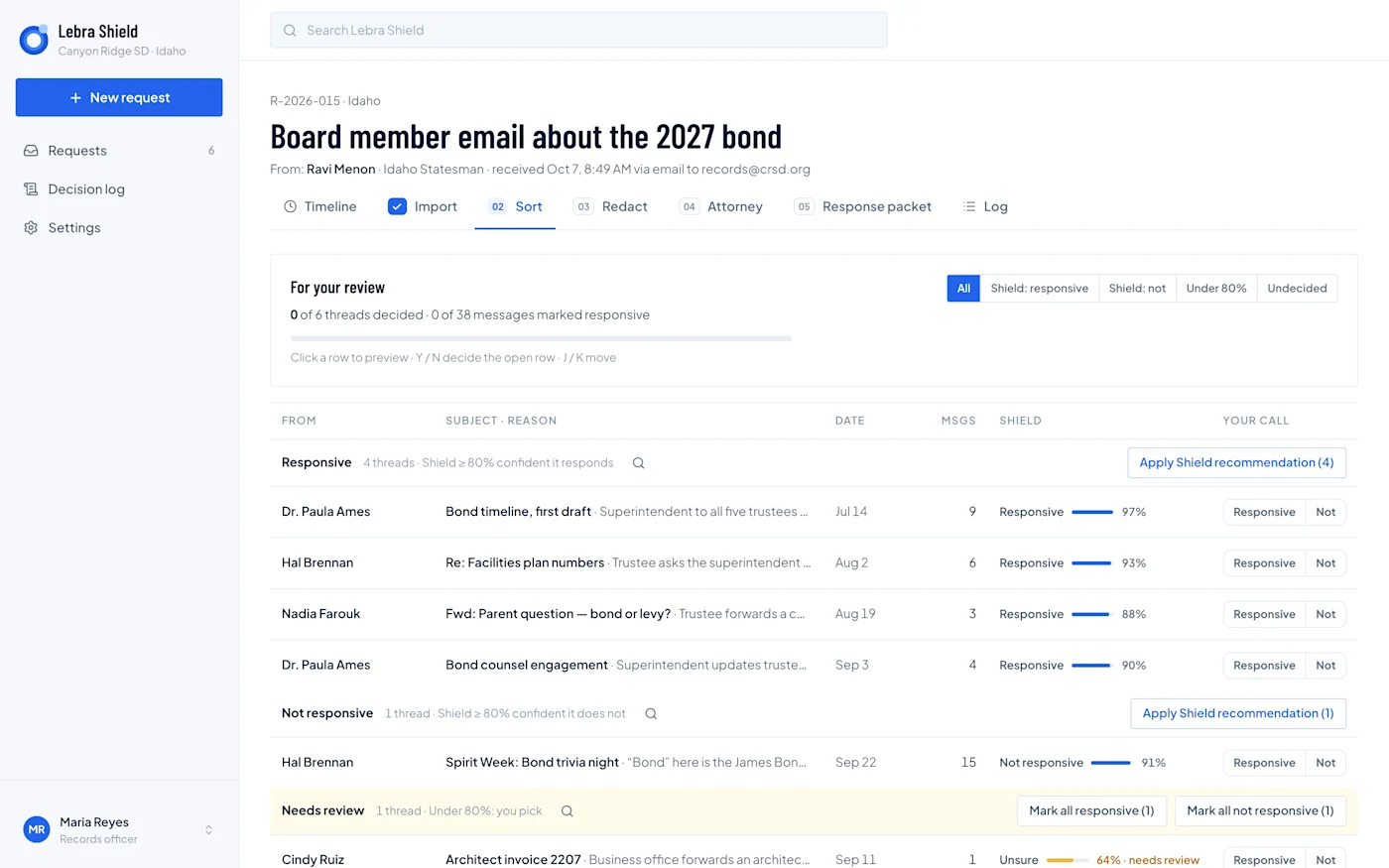
Shield demonstration Sort screen using fictional records. The interface illustrates how a reviewer sees suggestions and records a decision; the percentages shown are illustrative demo values.
Ask a reviewer to reverse a suggestion and explain the reason. Then ask a colleague to resume the same request. A workflow is easier to evaluate when you see how it handles correction and handoff, not only the happy path.
Make file support a written requirement
An “email import” label is not specific enough. List the exact formats your district exports and how attachments are packaged. Ask whether the tool reads original content, extracted text, scans, comments and spreadsheets, and what happens when extraction fails.
Shield’s documented workflow supports Google Vault MBOX/EML with metadata and several standalone document types. Its document review requires visual checks where layout or extraction can affect the output. OCR, PST and a general Microsoft 365 import workflow should not be assumed available. Live Vault or Purview connectors are also different from uploading an export.
Request a sample final production for each important file type. Decide which formats require a separate process before signing a contract.
Test roles, approval and requester access
Give the vendor a role-based scenario. A department contact contributes files, IT provides an export, an associate reviews, the custodian owns the response and counsel handles an uncertain issue. Ask who can see originals, private notes, draft output and final files.
In Shield’s current documented workflow, attorney review is optional and can be enabled for a request. Approval locks review decisions for production; it does not automatically deliver to the requester. Demonstrate both the ordinary custodian path and the counsel path.
Also inspect the requester experience. Check what the status page reveals, how files are delivered, and when access ends. Avoid assuming that an internal workflow screen tells you what an external recipient sees.
Treat retention and exit as buying criteria
Ask how the district exports its request history, source records, review decisions and final response. Identify any information that must remain in a separate district system.
Shield purges working request content when a custodian closes a request. Its requester downloads are available while the request remains open. The district should export and retain the required record copy before closure and address preservation obligations through its approved process.
This behavior may fit a district that wants a temporary review workspace. It requires deliberate planning if the district expects its request platform to be a permanent archive.
Compare total cost on the same assumptions
Ask every vendor to quote the same users, expected volume, storage, implementation, training, support and contract term. Identify optional modules and third-party licenses separately. Include the district’s effort to prepare files, maintain integrations, review suggestions and handle unsupported records.
For each requirement, mark “demonstrated,” “documented but not demonstrated,” “requires configuration,” or “not available.” Put the evidence beside the score. That is more defensible than assigning a high score because a vendor said it could be done.
Use our JustFOIA, NextRequest and GovQA guides for focused demonstration questions. Schedule a Shield walkthrough with the same test collection and ask for a written account of current state availability and product scope.
See what Lebra Shield can do for your district.
Schedule a demo